


WebRTC in Python lets a Python process act as a real-time communication peer that exchanges audio, video, and data with browsers and mobile apps over a direct peer-to-peer connection. The dominant library is aiortc, which implements the full WebRTC stack on top of asyncio. VideoSDK extends this capability with managed Python SDKs and server-side orchestration APIs that handle signaling, ICE negotiation, and media routing without you building the infrastructure from scratch. Start with the VideoSDK Python SDK docs to see the managed approach, or read on for the full raw WebRTC Python landscape.
Python has become a serious contender for server-side real-time media processing, and the reasons are straightforward. The language's async ecosystem, rich AI and ML library surface, and rapid prototyping cycle make it a natural fit for pipelines that need to ingest live video, run inference, and push results back in near real time. WebRTC, the browser-native protocol for sub-second peer-to-peer audio, video, and data exchange, is the transport layer that makes this possible.
When you combine WebRTC with Python, you unlock scenarios that are awkward to build in JavaScript alone: server-side AI video analytics, media transcoding gateways, robotic teleoperation over data channels, and bridge services that convert WebRTC streams into RTMP or HLS for CDN delivery. This article walks through what WebRTC in Python actually is, how the core components fit together, which libraries to choose, how to set up peer connections and media streams, and what production deployment really demands.
What is WebRTC in Python?
WebRTC is defined as a free, open-source project that provides browsers and mobile applications with real-time communication via simple application programming interfaces. It enables peer-to-peer audio, video, and arbitrary data streaming with sub-second latency, using a stack of protocols including ICE for connectivity establishment, DTLS for transport encryption, SRTP for encrypted media delivery, and SCTP for data channel messaging.
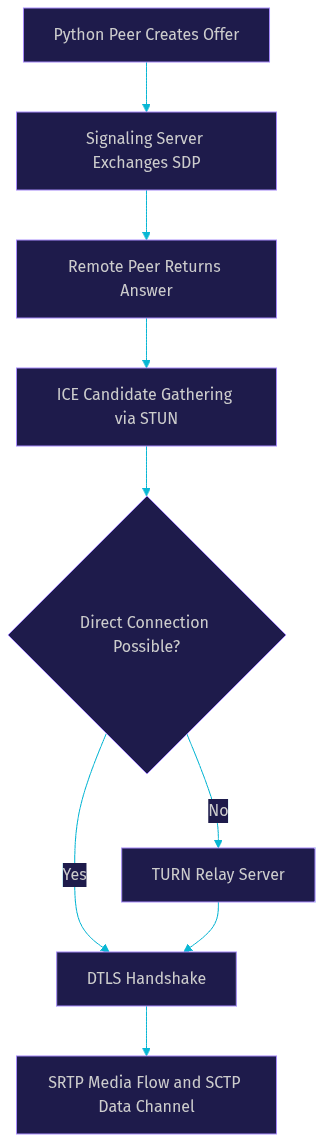
In Python, WebRTC works by running a native Python process that participates as a full peer in the WebRTC session rather than as a browser endpoint. The Python process creates an RTCPeerConnection object, generates session description protocol offers or answers, exchanges them with a remote peer through a signaling channel, and then establishes a direct encrypted media and data flow. This means a Python backend can receive a browser's camera feed, process each frame through a machine learning model, and send the annotated video back to the browser, all over the same WebRTC connection.
The dominant Python WebRTC library is aiortc, an asynchronous implementation built on asyncio that closely mirrors the browser JavaScript API. It supports audio and video tracks, data channels, ICE negotiation with STUN and TURN, and DTLS encryption. Emerging alternatives include reactor-webrtc for Twisted-based applications, wrtc as a Node.js binding option, and specialized audio-focused libraries. For most developers in 2026, aiortc remains the primary choice, and VideoSDK's Python SDK provides a managed layer on top for teams that want to skip the protocol-level plumbing.
Core Components of a Python WebRTC Peer
A Python WebRTC peer is built from four interlocking components that work together to establish and maintain a real-time connection. Understanding each piece is essential before you attempt an implementation, because debugging WebRTC issues almost always comes down to isolating which layer is failing.
RTCPeerConnection: The Central Object
The RTCPeerConnection object is the heart of any WebRTC implementation. It manages the lifecycle of a peer connection from creation through offer and answer exchange, ICE candidate gathering, DTLS handshake, and finally active media and data flow. In Python with aiortc, you create an RTCPeerConnection instance, register local media tracks or data channels on it, and then drive the negotiation process asynchronously. The object emits events when ICE candidates are discovered, when the connection state changes, and when remote tracks arrive.
Media Tracks and Data Channels
Media tracks represent the audio and video streams flowing through the peer connection. Each track has a codec, a clock rate, and a payload type negotiated during the SDP exchange. Data channels operate separately from media tracks and use SCTP over DTLS to deliver ordered, reliable, or unreliable message delivery depending on your configuration. In Python, you typically create media tracks from file sources, camera capture via OpenCV, or generated synthetic frames, then add them to the peer connection before sending the offer.
Signaling: The Out-of-Band Channel
WebRTC does not define a signaling protocol. The peers need an external channel to exchange SDP offers, SDP answers, and ICE candidates before the direct peer-to-peer connection can open. In Python implementations, this signaling channel is commonly built using WebSocket connections through frameworks like FastAPI or Flask, or through plain HTTP polling for simpler setups. VideoSDK's REST API reference handles signaling server-side as part of its managed room architecture, eliminating this manual step entirely.
ICE Negotiation: STUN and TURN
Interactive Connectivity Establishment (ICE) is the process by which two peers discover the best network path between them. Each peer gathers candidates including host addresses, server-reflexive addresses obtained via STUN servers, and relayed addresses obtained via TURN servers. For Python peers running in cloud environments behind NAT or firewalls, TURN server configuration is often mandatory, because the server's private IP address is not reachable from the browser.
Choosing a Python WebRTC Library
Selecting the right WebRTC library for your Python project depends on your async framework preference, media processing needs, and how close you want the API to mirror the browser JavaScript surface. Here is how the main options compare in 2026.
aiortc
aiortc is the most mature and widely adopted Python WebRTC library. It is built on asyncio, supports audio and video tracks, data channels, ICE with STUN and TURN, and DTLS encryption. Its API closely follows the browser WebRTC specification, which makes it familiar to developers who have used WebRTC in JavaScript. The library integrates well with OpenCV for video frame processing and PyAV or PyAudio for audio handling. It is actively maintained and has the largest community among Python WebRTC libraries.
reactor-webrtc
reactor-webrtc is designed for applications built on the Twisted async framework rather than asyncio. If your existing backend is Twisted-based, this library avoids the need to run two event loops. However, it has a smaller community, less frequent updates, and fewer media processing integrations compared to aiortc.
wrtc and Specialized Libraries
wrtc provides Node.js bindings accessible from Python through subprocess or bridge mechanisms, but it is not a native Python implementation and introduces inter-process communication overhead. Specialized audio libraries like pywebrtc-audio focus narrowly on audio processing and lack full video and data channel support.
Decision Matrix
| Criterion | aiortc | reactor-webrtc | wrtc | VideoSDK Python SDK |
|---|---|---|---|---|
| Async framework | asyncio | Twisted | Node bridge | asyncio |
| API similarity to browser | High | Medium | High | Managed abstraction |
| Video and audio support | Full | Partial | Full | Full |
| Data channels | Yes | Yes | Yes | Yes |
| Media processing integration | OpenCV, PyAV, PyAudio | Limited | Limited | Built-in transcription, recording |
| Maintenance activity | Active | Low | Low | Active, managed service |
| Best for | Custom WebRTC peers in Python | Twisted-based apps | Quick prototyping | Production RTC without infrastructure |
For most developers, aiortc is the right starting point for custom WebRTC work in Python. For teams that want to skip protocol-level complexity and ship faster, the VideoSDK Python SDK provides a managed alternative with built-in recording, transcription, and room management.
Setting Up a Basic Peer Connection
Building a basic WebRTC peer connection in Python involves several sequential steps that mirror the browser-side flow but require you to handle signaling and event handling explicitly in Python code.
Prerequisites
You need Python 3.8 or later, a virtual environment to isolate dependencies, and an async-friendly web framework for the signaling layer. Most developers use FastAPI because it supports WebSocket endpoints natively and pairs naturally with asyncio. You also need a STUN server address for ICE candidate gathering, and in production, a TURN server for NAT traversal.
Installing the Library
The primary library, aiortc, is installed through Python's package manager. You run the standard installation command for aiortc and its dependencies, which include the cryptography library for DTLS, PyAV for media codec support, and aioice for ICE negotiation. The installation pulls in compiled native extensions, so you need development headers for libsrtp, libopus, and libvpx on Linux systems.
Creating the Signaling Server
The signaling server is a lightweight application that relays SDP offers, SDP answers, and ICE candidates between the Python peer and the browser peer. A typical setup uses a FastAPI WebSocket endpoint that accepts JSON messages containing a type field (offer, answer, or candidate) and a payload field with the SDP or candidate data. The server simply forwards each message to the connected remote peer. VideoSDK's REST APIs handle this entire signaling flow as part of room creation and token-based participant joining, which is worth considering if you want to avoid building and maintaining a signaling server.
Initializing the Peer and Exchanging SDP
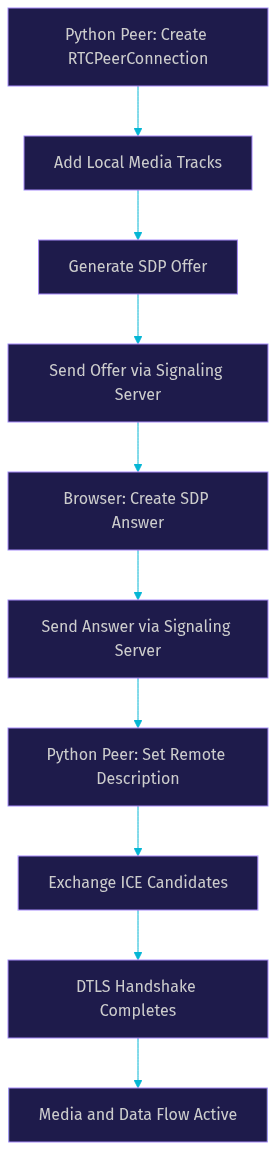
Once the signaling channel is ready, the Python peer creates an RTCPeerConnection instance. If you plan to send media, you add local tracks before generating the offer. The peer then creates an SDP offer, sets it as the local description, and sends it through the signaling channel to the browser. The browser creates an SDP answer, sets it as its local description, and sends it back. The Python peer sets the received answer as its remote description, completing the SDP exchange.
Handling ICE Candidates
During and after the SDP exchange, both peers gather ICE candidates. Each discovered candidate must be sent through the signaling channel to the remote peer, which adds it to its peer connection. This process continues until a viable connection path is found or all candidates are exhausted. In aiortc, ICE candidate events are handled through async callbacks, and you must ensure the event loop remains responsive during candidate gathering.
Common Errors During Setup
The most frequent setup errors are invalid or expired STUN server addresses, missing TURN configuration when the Python peer runs behind a cloud NAT, and event loop conflicts when blocking operations are called inside async handlers. If the connection never reaches the connected state, check that ICE candidates are being exchanged bidirectionally and that the remote description is set before candidates are added.
Adding Media Streams
Once the peer connection is established, the next step is sending and receiving real audio and video media through the connection. This is where Python WebRTC implementations diverge most from browser implementations, because Python does not have a built-in camera or microphone API.
Capturing Audio and Video in Python
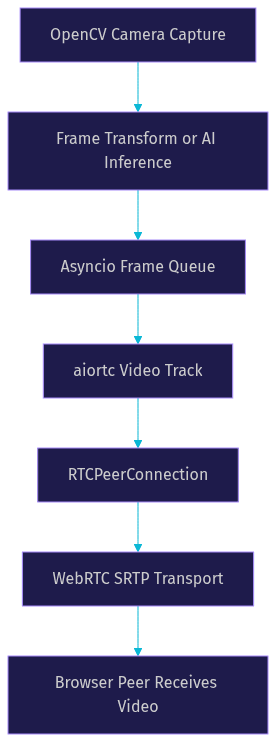
For video capture, most developers use OpenCV, which provides frame-by-frame access to connected cameras or video files. Each frame is a NumPy array that you can transform, annotate, or run through a machine learning model before sending it as a WebRTC video track. For audio capture, PyAudio or sounddevice provide access to microphone input as raw PCM samples. The key concept is that you create a custom track class that yields frames or audio samples on demand, and the WebRTC library pulls from that track at the appropriate rate.
Adding Tracks to the Peer Connection
After creating your media tracks, you add them to the RTCPeerConnection instance before sending the offer. The library negotiates codecs with the remote peer during the SDP exchange. Common video codecs include VP8 and H.264, while audio typically uses Opus. If the Python peer and the browser support different codecs, the connection will fail to establish media flow, so you need to verify codec compatibility on both sides.
Handling Remote Tracks
When the remote peer sends media, the Python peer receives remote track events. You handle these by reading frames from the remote track asynchronously and processing them as needed. For example, you might write incoming video frames to disk for recording, run object detection on each frame, or forward the audio to a speech-to-text pipeline.
Tips for Low-Latency Processing
To keep latency low, process frames as they arrive rather than buffering them. Use asyncio queues to decouple frame capture from frame processing, and avoid blocking the event loop with synchronous operations. If you need to run a CPU-intensive model on each frame, consider offloading that work to a process pool executor so the event loop stays responsive. VideoSDK's built-in real-time transcription and recording features handle this pipeline for you if you prefer not to build the frame processing loop manually.
Using Data Channels for Real-Time Messaging
Data channels provide a way to send arbitrary binary or text messages between peers with low latency, without involving media codecs or audio/video processing. They are useful for chat messages, sensor data transmission, remote control signals, and any application where you need structured real-time data exchange alongside or instead of media.
In a Python WebRTC implementation, you create a data channel on the RTCPeerConnection before sending the offer. The channel has a label and optional configuration for ordered delivery and reliability. Once the connection is established, you can send messages by writing to the channel, and you receive messages through an async callback handler.
Typical use cases include sending control commands from a browser to a Python-based robot or IoT device, transmitting telemetry data from sensors to a dashboard application, and building in-call chat or signaling overlays. Data channels are particularly powerful in Python because they let you bridge real-time browser interactions with server-side Python logic, AI inference triggers, or database writes without a separate HTTP round trip.
Production Considerations
Running WebRTC in Python at production scale introduces a different set of challenges compared to a localhost prototype. The Python Global Interpreter Lock (GIL), CPU-bound media processing, network security, and deployment infrastructure all need careful attention.
Scaling Limits and the GIL
Python's GIL means that a single process cannot execute CPU-bound work in parallel across multiple cores. For WebRTC media processing, which involves encoding, decoding, and potentially running AI models on each frame, this becomes a bottleneck quickly. If you are processing a single peer's video at 30 frames per second, one core may be sufficient. But if you need to handle 10 or 50 concurrent peers, you need to either run multiple Python processes behind a load balancer or offload media routing to a Selective Forwarding Unit (SFU). VideoSDK's cloud infrastructure handles this scaling automatically through its room-based architecture, which routes media through a managed SFU without you provisioning servers.
Security: DTLS and Certificate Handling
WebRTC mandates DTLS encryption for all media and data channel traffic. In aiortc, the library generates self-signed certificates automatically for each peer connection. In production, you should manage certificate lifecycle explicitly, especially if your Python peer runs as a long-lived service. Ensure that your signaling channel is also secured with HTTPS and WebSocket Secure (WSS) to prevent man-in-the-middle attacks on the SDP exchange.
Deployment: HTTPS, TURN, and Containerization
Production deployment requires HTTPS for any web page that accesses cameras or microphones, which means your signaling server must terminate TLS. You need a TURN server configured with proper credentials for peers behind restrictive NATs or corporate firewalls. Coturn is the most common open-source TURN server implementation. For containerization, package your Python WebRTC application in a Docker image that includes all native dependencies, and ensure the container exposes the necessary UDP port range for ICE candidate connectivity.
Monitoring and Logging
WebRTC connections fail silently in ways that HTTP APIs do not. You need structured logging at each layer: signaling message exchange, ICE candidate gathering results, DTLS handshake status, and per-track frame statistics. Monitor connection state transitions and alert on peers stuck in the connecting or failed states. Browser-side console logs and the WebRTC internal stats API are invaluable for diagnosing issues that appear only in specific network conditions.
Real-World Use Cases
Python WebRTC shines in scenarios where server-side processing of real-time media is the core requirement. Here are three production patterns that teams are actively building in 2026.
AI video analytics pipeline: A browser sends its camera feed to a Python peer running a YOLO or similar object detection model. The Python peer annotates each frame with bounding boxes and labels, then sends the processed video back to the browser over the same WebRTC connection. This pattern is common in industrial inspection, retail analytics, and telemedicine applications.
Server-side recording and transcoding: A Python peer joins a WebRTC session as a hidden participant, receives all media tracks, and writes them to disk or transcodes them to a different codec for archival or CDN delivery. This avoids browser-side recording limitations and gives you full control over output format and quality.
Bridging WebRTC to RTMP or HLS: A Python peer receives a WebRTC stream from a browser-based broadcaster and re-publishes it as RTMP to YouTube or Twitch, or converts it to HLS for large-scale CDN distribution. This bridge pattern is essential for live shopping, virtual events, and gaming streams where the source is WebRTC but the audience delivery is a CDN protocol. VideoSDK's Interactive Live Streaming mode handles this bridge natively with RTMP output support.
Common Pitfalls and Troubleshooting
WebRTC in Python has a set of recurring failure modes that catch developers off guard. Knowing them in advance saves hours of debugging.
ICE failures due to NAT or firewall: The Python peer cannot be reached by the browser because it sits behind a cloud NAT with a private IP address. The fix is configuring a TURN server with proper credentials and ensuring the UDP port range is open in your cloud security group.
Mismatched codecs: The Python peer negotiates VP8 video but the browser only supports H.264, or vice versa. Media flows are established but no video appears. Check the SDP exchange in browser console logs to verify that at least one common codec exists for each media type.
Async event-loop conflicts: Calling a blocking function inside an async handler freezes the event loop, causing ICE timeouts and missed frame deadlines. Use the run in executor method for any blocking operation, and never call the time sleep function inside a coroutine.
Diagnosing with logs: Enable debug-level logging for aiortc, aioice, and your signaling server. The logs will show ICE candidate types gathered, DTLS handshake progress, and track negotiation results. On the browser side, use the WebRTC internal stats page to inspect incoming and outgoing track statistics.
Definitions Glossary
RTCPeerConnection: The central WebRTC object that manages the peer connection lifecycle, including offer and answer exchange, ICE negotiation, DTLS handshake, and media track management. In Python, aiortc provides this as an async class.
ICE (Interactive Connectivity Establishment): The protocol by which two WebRTC peers discover network paths to each other using host candidates, STUN-discovered server-reflexive candidates, and TURN-relayed candidates.
SDP (Session Description Protocol): The text-based format used to describe media sessions, including codecs, payload types, and transport parameters, exchanged between peers during WebRTC negotiation.
Data Channel: A bidirectional messaging channel built on SCTP over DTLS that delivers text or binary messages between peers with configurable reliability and ordering guarantees.
SFU (Selective Forwarding Unit): A media server that receives media from all participants and selectively forwards streams to each recipient, enabling multi-party calls without mesh topology. VideoSDK's cloud infrastructure uses SFU-based routing.
Key Takeaways
- WebRTC in Python lets a server-side Python process act as a full peer in real-time audio, video, and data exchange with browsers and mobile apps, using libraries like aiortc built on asyncio.
- aiortc is the dominant Python WebRTC library in 2026, offering the closest API to the browser specification with full support for media tracks, data channels, ICE, and DTLS encryption.
- Signaling is not part of the WebRTC specification and must be implemented separately, typically using WebSocket endpoints through FastAPI or Flask, unless you use a managed solution like VideoSDK that handles it server-side.
- Production deployment requires TURN server configuration for NAT traversal, HTTPS for secure signaling, containerization with native dependencies, and careful handling of the Python GIL for concurrent peer processing.
- For teams that want real-time communication without building and maintaining WebRTC infrastructure, VideoSDK's Python SDK and REST APIs provide managed room creation, token authentication, recording, and transcription out of the box.
Conclusion
WebRTC in Python opens up a category of real-time applications that are difficult to build in any other language: server-side AI video processing, media transcoding gateways, and protocol bridges between WebRTC and traditional streaming formats. The aiortc library gives you the protocol-level tools to build these systems, but the production complexity of signaling, ICE negotiation, TURN provisioning, and concurrent scaling is real. If you are building a custom media processing pipeline, aiortc is the right starting point. If you need production-ready real-time communication with built-in recording, transcription, and multi-platform SDK support, explore the VideoSDK documentation and start with a free account at app.videosdk.live/login. What are you building with WebRTC in Python? Drop a comment below, I'd love to hear what kind of real-time media use case you're working on.
Free $20 Balance for AI Voice Agents & Video Calls
FAQ