


Flutter Socket.IO is the practice of connecting a Flutter app to a Socket.IO server for real-time, event-based communication using a Dart client package such as socketioclient. It gives you WebSocket transport with automatic fallback, reconnection handling, and event-driven messaging across mobile, web, and desktop. This guide covers package selection, conceptual setup, lifecycle management, authentication, and production best practices, plus where a managed real-time SDK like VideoSDK fits when you need audio and video, not just messages.
Building a real-time chat app in Flutter sounds simple until the first user's train goes through a tunnel. The connection drops, events vanish, and your carefully crafted UI shows stale messages. That's the moment most developers discover that raw WebSockets in Flutter leave you handling reconnection, heartbeat, and fallback logic entirely on your own.
Flutter Socket.IO solves that. This guide walks through the main Dart packages, a conceptual setup you can follow without copy-pasting anything, connection lifecycle management, event handling patterns, authentication, and the production practices that separate a demo from a shipped app.
What Is Socket.IO?
Socket.IO is defined as a real-time, event-based communication layer built on top of WebSocket, with additional guarantees the raw protocol doesn't give you. Socket.IO works by establishing a WebSocket connection when possible, falling back to HTTP long-polling when WebSocket is blocked by proxies or firewalls, and wrapping everything in an event system where clients and servers emit and listen for named events rather than raw byte streams.
That fallback mechanism is why Socket.IO became the default choice for chat apps, live dashboards, and IoT telemetry. It also adds automatic reconnection, packet acknowledgments, rooms, and namespaces, features you'd otherwise rebuild yourself on a plain WebSocket connection.
Why Use Socket.IO with Flutter?
Flutter developers benefit from Socket.IO because one Dart client package covers iOS, Android, web, and desktop from a single codebase. The event model maps naturally onto Flutter's reactive architecture: an incoming event updates state, and the framework rebuilds the affected widgets.
The Dart ecosystem is mature here. The main community packages have tracked null safety, and the underlying protocol is battle-tested across millions of production apps. If your backend already runs a Node.js Socket.IO server, connecting Flutter to it is a solved problem rather than a research project.
Overview of Flutter Socket.IO Packages
Four community packages dominate the Flutter Socket.IO landscape. The most widely used is socketioclient, a direct Dart port of the official JavaScript client. It supports the full protocol, including namespaces, acknowledgments, and reconnection options, and it has the largest community answering questions when something breaks.
socketioclient_flutter is a wrapper that adds Flutter-friendly conveniences on top of the core client, though it sees less frequent maintenance. socketiolite takes the opposite approach: a minimal, lightweight implementation with a smaller dependency footprint, suited to projects that only need basic emit and listen behavior. fluttersocketio is an older option that predates the null-safety era and is generally not recommended for new projects in 2026.
The key differentiators are null-safety support, dependency size, protocol version coverage, and maintenance activity. For most new projects, socketioclient is the safe default because it mirrors the official client's behavior most closely.
Choosing the Right Package
Use this decision framework when picking a Flutter Socket.IO package:
- Null safety and Dart 3 compatibility: non-negotiable for any project started in 2026. Eliminates fluttersocketio immediately.
- Dependency footprint: if you're shipping a lightweight app where binary size matters, socketiolite is worth evaluating.
- Protocol feature coverage: if you need acknowledgments, namespaces, or custom reconnection strategies, socketioclient is the only fully featured choice.
- Maintenance activity: check the package's changelog and issue tracker before committing. A package untouched for over a year is a production risk.
For feature-rich projects, choose socketioclient. For minimal messaging in a size-constrained app, evaluate socketiolite. Avoid unmaintained wrappers unless you're prepared to fork them.
Conceptual Setup Without Code
The logical setup path for Flutter Socket.IO follows five steps, and understanding the intent behind each one matters more than memorizing syntax.
First, add your chosen package as a dependency in your Flutter project. Second, configure the server URL, deciding whether the connection starts with WebSocket transport directly or begins with polling and upgrades, which matters in restrictive corporate networks. Third, decide on transport options: WebSocket-only is faster, but allowing the HTTP fallback makes the app resilient behind aggressive proxies.
Fourth, initialize the connection, typically as a singleton service class that lives outside your widget tree so the connection survives navigation. Fifth, and most critically, set up a server-side token generator for authentication. Never embed long-lived credentials in the Flutter app itself. Your backend should issue a short-lived token at login, and the socket connection should present that token during the handshake.
The overall architecture looks like this:
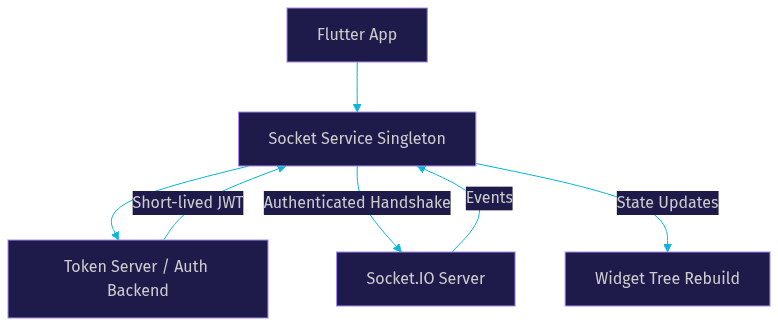
The pattern to internalize: the Flutter app talks to a token server first, then carries that credential into the socket handshake, and the event loop feeds state changes back into the UI.
Managing the Connection Lifecycle
A Flutter Socket.IO connection moves through five states: disconnected, connecting, connected, reconnecting, and closed. The package you choose reports these states through connection events, and your app should react to each one rather than assuming the socket is always live.
Automatic reconnection is built into the protocol, but the default behavior reconnects aggressively. In production, configure exponential back-off so a device in a dead zone doesn't hammer your server every few seconds. A sensible strategy starts with a short delay and doubles it up to a cap, then gives up after a maximum attempt count and surfaces a "connection lost" state to the user.
Heartbeat monitoring runs underneath: the client and server exchange periodic ping-pong packets, and a missed heartbeat triggers the reconnect path. Your job is to make the UI honest about the current state, showing an offline indicator during reconnecting rather than letting users type into a void.
Event Handling Patterns
Event handling is where Flutter Socket.IO shines. Instead of parsing raw messages, you listen for named events, such as a new message event or a presence update, and emit your own named events when the user acts. This maps cleanly onto state management solutions like Riverpod or Bloc, where each incoming event becomes a state mutation.
Acknowledgments deserve special attention. When you emit an event with an acknowledgment callback, the server confirms receipt, which is essential for actions that must not be silently lost, like sending a chat message. If the acknowledgment never arrives within a timeout, your app can retry or show an error.
Structure payloads consistently: agree on a shared shape for event data between your Flutter client and server, keep payloads small and flat, and version your event names if the schema evolves. Duplicate listeners are a classic Flutter bug, so make sure your socket service registers each listener once and removes it when the owning screen disposes.
Namespaces and Rooms
Namespaces and rooms are Socket.IO's two grouping mechanisms, and they serve different purposes. A namespace is a separate communication channel on the same server, identified in the connection URL, suited to splitting concerns like a chat namespace versus a notification namespace. A room is a dynamic grouping within a namespace, where clients join and leave at runtime, suited to group chats or per-document collaboration.
For scalability, rooms matter most. A server broadcasting to a room only delivers events to its members, which keeps a thousand-user app from sending a thousand individual messages per event. Use namespaces for architectural separation and rooms for audience targeting.
Authentication and Extra Headers
Flutter Socket.IO authentication typically works by attaching credentials during the handshake. The most common approach is passing a short-lived JWT issued by your backend, either as a query parameter or through extra headers, depending on what your server accepts. Extra headers are the cleaner option when the server middleware expects an authorization header, though header support on the web platform has limitations worth verifying for your target browsers.
On the server side, the handshake middleware validates the token before the connection is accepted, rejecting unauthenticated sockets before they join any namespace. Tokens should expire quickly and be refreshed through your normal auth flow, so a leaked token has a short useful life. For sensitive apps, pair this with certificate pinning on the mobile side so the transport itself can't be intercepted.
Best Practices for Production
Shipping a Flutter Socket.IO app to production changes the requirements. The practices below are the difference between an app that works on your desk and one that works in the wild:
- Enable TLS everywhere. A socket connection over plain HTTP leaks every event, including auth tokens, to anyone on the same network.
- Handle network interruptions gracefully. Assume the connection will drop mid-session and design the UI to recover without losing user input.
- Limit reconnection attempts. Infinite retries drain battery and hammer your server. Cap attempts, then let the user manually retry.
- Monitor latency. Track round-trip time on acknowledged events so you can detect degradation before users complain.
- Use logging and analytics. Log connection state transitions and event failures to a service you can inspect after release.
Debugging and Testing Strategies
Debugging Flutter Socket.IO starts with visibility. Log every connection state transition and every event received, at least in debug builds, so you can see exactly when the connection dropped and what the last successful event was. The Socket.IO server console is your second tool: server-side connection logs reveal handshake failures and authentication rejections that look like silent dead air on the client.
Simulate network loss during development by toggling airplane mode or using your platform's network conditioning tools, and verify your reconnection and back-off behavior actually recovers. For automated testing, write unit tests around your event handling and payload parsing logic by mocking the socket layer, so your state management can be verified without a live server. Integration tests against a local Socket.IO server catch protocol mismatches before they reach production.
Performance and Security Considerations
Latency expectations should be realistic: a well-configured Socket.IO connection over WebSocket typically delivers messages in well under a few hundred milliseconds on a good network, but fallback polling adds noticeable delay. Optimize payload size by sending compact, flat JSON and avoiding repeated static data in every event. Enable compression for larger payloads, though for small frequent events compression overhead can cost more than it saves.
On security, use TLS for every production connection, pin certificates on mobile where the threat model justifies it, keep token lifetimes short, and validate every event payload server-side. Never trust the client: the server must re-check permissions on every sensitive event, because a handshake token proves identity once, not authorization forever.
Common Pitfalls and How to Avoid Them
The most frequent Flutter Socket.IO failures come from a handful of predictable mistakes:
- Mismatched protocol versions: the Socket.IO protocol has revisions, and a client package built for an older protocol may fail to handshake with a newer server. Align client and server versions deliberately.
- Missing null-safety migration: older packages crash on Dart 3 projects. Choose a maintained, null-safe package from the start.
- Duplicate listeners: registering the same event listener on every widget rebuild causes events to fire multiple times. Centralize listeners in a singleton service.
- Ignoring the web platform's limitations: browser WebSocket implementations restrict custom headers, which affects authentication strategies on Flutter web.
- Assuming the connection is always live: always check connection state before emitting critical events, and use acknowledgments to confirm delivery.
Real-World Use Cases
Three scenarios illustrate how these concepts come together. A real-time chat app uses namespaces for chat versus notifications, rooms for group conversations, acknowledgments for message delivery, and JWT handshake auth. A live sports score app uses lightweight event payloads, aggressive reconnection with back-off, and a single broadcast event per score change to keep thousands of viewers in sync. An IoT sensor dashboard uses rooms per device group, compact payloads to respect constrained networks, and heartbeat monitoring to flag offline sensors quickly.
When your real-time needs extend beyond events into live audio and video, a managed approach like VideoSDK's Flutter SDK handles the media layer, with rooms, participants, and adaptive streaming built in, so you're not stitching WebRTC onto a Socket.IO backbone yourself.
When Socket.IO Alone Isn't Enough
Socket.IO excels at message and event delivery, but it doesn't transport audio or video. If your Flutter app needs calling, live streaming, or voice rooms, you need a real-time media SDK. VideoSDK provides Flutter-ready video and audio calling with sub-second latency, recording, and chat built in, and its interactive live streaming mode handles audience interaction at scale. A common production architecture pairs Socket.IO for lightweight signaling and presence with VideoSDK for the media plane, and the REST APIs let your server orchestrate rooms and recordings alongside your existing Socket.IO backend.
Definitions Glossary
Socket.IO: An event-based, real-time communication layer built on WebSocket with HTTP fallback, automatic reconnection, acknowledgments, rooms, and namespaces.
Namespace: A separate communication channel on a Socket.IO server, chosen at connection time, used to split concerns such as chat versus notifications.
Room: A dynamic grouping of connected clients within a namespace, joined and left at runtime, used for targeted broadcasting such as group chats.
Acknowledgment: A confirmation callback attached to an emitted event, allowing the sender to verify the server received and processed it.
Exponential back-off: A reconnection strategy that doubles the delay between retry attempts up to a cap, preventing a struggling client from overwhelming the server.
Handshake: The initial connection negotiation in Socket.IO, where transport is selected and authentication credentials are presented and validated.
Key Takeaways
- Choose socketioclient for feature-rich Flutter Socket.IO projects in 2026; it's the maintained, null-safe port of the official client with full protocol support.
- Centralize the socket connection in a singleton service, register listeners once, and reflect connection state honestly in the UI.
- Authenticate with short-lived server-issued tokens during the handshake, and re-validate authorization on every sensitive server-side event.
- Configure reconnection with exponential back-off and a maximum attempt count rather than relying on aggressive defaults.
- Socket.IO handles events and messages well, but for live audio and video in Flutter, pair it with a media SDK like VideoSDK's Flutter SDK.
Conclusion
Flutter Socket.IO gives you a proven, event-driven real-time layer across every platform Flutter targets, provided you pick a maintained package, design the connection lifecycle deliberately, and secure the handshake. The decision framework is simple: socketioclient for full-featured apps, a lightweight alternative only when binary size genuinely constrains you, and a managed media SDK like VideoSDK when your real-time needs include audio and video. Start with the official socketioclient documentation and the VideoSDK Flutter quickstart, and sign up free at app.videosdk.live to explore the media side. What are you building with Flutter Socket.IO? Drop a comment, I'd love to hear what kind of real-time use case you're working on.
Free $20 Balance for AI Voice Agents & Video Calls
FAQ