



Angular SocketIO is the combination of Angular's component-based frontend framework with Socket.IO's real-time, bidirectional communication library, typically used to power chat, notifications, and live dashboards. Socket.IO runs on WebSockets and automatically falls back to HTTP long-polling when WebSockets are blocked, so your Angular app stays connected in hostile network conditions. This guide walks through the full integration conceptually, from service design to production deployment, without code snippets, focusing on the decisions that make real-time Angular apps reliable.
Introduction
Modern single-page applications are no longer static pages that fetch data once. Users expect live chat, instant notifications, collaborative editing, and dashboards that update the moment data changes. Polling a REST endpoint every few seconds is a poor substitute: it wastes bandwidth, adds latency, and scales badly.
Angular, with its component architecture, dependency injection, and first-class RxJS support, is well suited to consuming real-time streams. Socket.IO, built on WebSockets with automatic fallback to long-polling, handles the transport layer, reconnection logic, and event-based messaging. Together they form a proven stack for real-time Angular applications.
This guide explains how the pieces fit together, how to design an Angular service around Socket.IO, how to map events to RxJS streams, and how to secure, optimize, and deploy the result. Concepts and decisions come first; you can apply them with any Angular 15+ project and Socket.IO 4.x client.
What is Angular SocketIO?
Angular is defined as a TypeScript-based, component-driven frontend framework maintained by Google, where applications are composed of nested components managed through dependency injection and reactive templates. Socket.IO is defined as a real-time communication library that provides bidirectional, event-based messaging between a browser client and a Node.js server, using WebSockets as its primary transport with automatic fallback to HTTP long-polling.
Angular SocketIO refers to the integration pattern where an Angular application establishes a persistent Socket.IO connection, typically wrapped in an injectable service, and translates server events into RxJS observables that components consume. This pattern suits chat applications, live notifications, collaborative editing, trading dashboards, multiplayer games, and presence indicators.
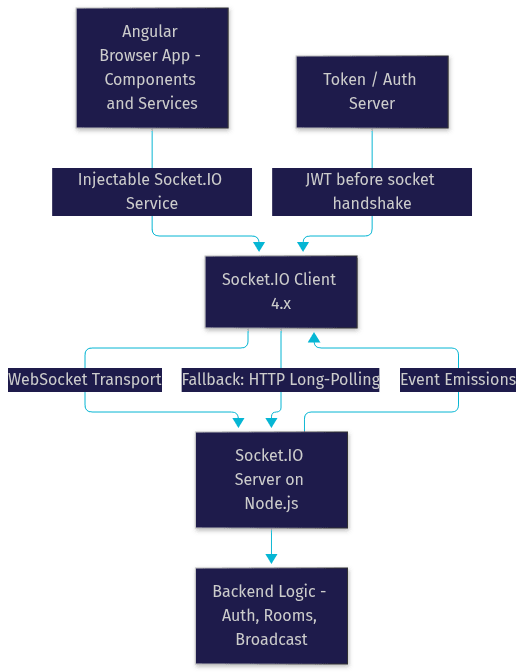
The two libraries complement each other naturally. Angular provides structure, typing, and reactive templating; Socket.IO provides the transport, reconnection handling, rooms, namespaces, and acknowledgements. The diagram below shows the architecture of a typical Angular SocketIO setup, including the fallback transports that keep the connection alive when WebSockets fail.
Preparing Your Development Environment for Angular SocketIO
Before wiring anything up, get the toolchain right. You need a Node.js LTS release, the Angular CLI, and a package manager such as npm. As of 2026, Angular 15 and above works cleanly with the Socket.IO 4.x client library, and staying on these major versions avoids the protocol mismatches that plague older tutorials.
Structure your workspace with two separate folders: one for the Angular client, one for the Node.js server that hosts Socket.IO. Keeping them separate mirrors production, where the client is served as static assets and the server runs as its own process. It also forces you to think about cross-origin requests from day one instead of discovering CORS issues at deploy time.
Verify versions early. A mismatched Socket.IO client and server pair can silently degrade to polling or fail the handshake entirely. Pin your versions in the project manifest rather than floating on latest, and check the official Socket.IO documentation for the current compatibility matrix when upgrading either side.
Designing the Angular SocketIO Service
The heart of any Angular SocketIO integration is a single injectable service that encapsulates the connection. Components should never talk to the socket directly. Instead, the service owns the connection lifecycle and exposes two things: methods for emitting events outward, and RxJS observables for incoming event streams.
Angular's dependency injection makes this clean. Register the service at the root level so it behaves as a singleton, meaning one socket connection shared across the entire application. Lazy-loaded feature modules can share the same instance, avoiding the classic bug of multiple sockets opened by different components.
Design the service's public surface deliberately. Each server event you care about, such as a new chat message or a presence update, becomes a named observable that components subscribe to. Each client action, such as joining a room or sending a message, becomes a typed method that emits the corresponding event. Internally, the service initializes the connection, attaches listeners, and pushes incoming payloads into RxJS subjects.
The flow below shows how the service mediates between Angular components and the Socket.IO server.
TypeScript interfaces matter here. Define a payload shape for every event so the compiler catches malformed messages at build time rather than at runtime in a user's browser.
Managing the Angular SocketIO Connection Lifecycle
Decide when the connection starts. Most applications connect during application initialization, using Angular's app initializer hook, so the socket is ready before the first component that needs it renders. Others connect lazily on first login, which pairs naturally with token-based authentication.
Socket.IO has built-in reconnection, but you should tune it. Configure reconnection attempts, an exponential back-off delay, and a randomization factor so thousands of reconnecting clients do not stampede your server after a network blip. Surface connection state to the UI: a banner or indicator showing "reconnecting" prevents users from assuming the app is broken.
Cleanup is where memory leaks happen. When a component that subscribes to socket observables is destroyed, its subscriptions must be torn down. The async pipe handles this automatically, and manual subscriptions should be tied to the component's destroy lifecycle so no listener outlives its component. A service-level disconnect during logout or app teardown closes the socket entirely and releases server resources.
Event Handling and Data Flow in Angular SocketIO
The core pattern of Angular SocketIO is mapping socket events to RxJS streams. Each named server event feeds a subject inside your service, and components subscribe to the resulting observables. This gives you the full RxJS toolkit: operators to filter, map, debounce, buffer, and scan incoming data before it reaches the template.
Angular's async pipe is the natural consumer. A component binds an observable of chat messages directly in its template, and the pipe handles subscription, change detection, and unsubscription. Combined with Angular's OnPush change detection strategy, this keeps real-time updates efficient even under high event frequency.
Consider three concrete scenarios. In a chat app, each incoming message event appends to a message list observable, and typing indicators use short-lived events debounced on the client. In a live notification system, server events feed a badge counter and a toast queue, with buffering so bursts of notifications do not flood the screen. In collaborative editing, high-frequency change events are throttled and merged so two editors see a consistent document without churning the UI.
Payload design deserves attention. Keep events small and purposeful: one event type per semantic action, with a versioned payload shape. Define TypeScript interfaces for every payload and validate them on the server too, because a client that trusts its own types alone is one malformed message away from a broken view.
Security and Authentication in Angular SocketIO
A socket connection is an authenticated endpoint like any API route, and it must be treated as one. The standard flow is token-based: the Angular app authenticates against your auth server, receives a JWT, and presents that token during the Socket.IO handshake. The server validates the token before accepting the connection, and rejects unauthenticated handshakes outright.
Use Socket.IO namespaces and rooms as authorization boundaries. A room representing a private conversation should verify membership on the server before letting a client join, never trusting a client-supplied room name. Middleware on the server side is the right place for this validation, applied to every incoming connection.
Guard against the common attacks. Injection is prevented by validating payload shapes server-side rather than passing client data directly into queries or templates. Replay attacks are mitigated by short-lived tokens and by rejecting stale handshakes. Unauthorized room access is prevented by server-side membership checks on every join request. Finally, transmit tokens over HTTPS only, and prefer passing credentials in the handshake rather than as query parameters, which appear in logs.
Angular SocketIO Performance Optimizations
Real-time apps fail through volume before they fail through anything else. Throttle high-frequency events at the source: a collaborative editor emitting a change per keystroke should batch or debounce before sending. On the receiving side, debounce UI updates so a burst of events results in one render, not fifty.
Leverage Socket.IO's built-in capabilities. Its automatic compression reduces payload size for text-heavy events, and its binary support handles images, audio, and other blobs efficiently without base64 inflation. Prefer sending deltas rather than full state: telling the client "field X changed to Y" beats resending an entire object graph.
Monitor what you ship. Angular DevTools helps you spot excessive change detection cycles caused by frequent emissions. Server-side logging of event rates and connection counts reveals hot spots before users feel them. For teams building beyond chat into full video or voice, platforms like VideoSDK's real-time communication APIs extend the same event-driven model to media streams with sub-300ms latency.
Testing and Debugging Angular SocketIO
Debugging real-time code requires watching the wire. Browser developer tools show every WebSocket frame, letting you confirm that events fire, payloads match your interfaces, and the transport is actually WebSocket rather than a silent fallback to polling. The Socket.IO client also exposes a debug flag that logs its internal handshake and reconnection decisions.
Simulate hostile conditions before your users do. Chrome's network throttling lets you test slow and offline scenarios, verifying that your reconnection UI appears and that buffered events recover gracefully. Disconnect the socket mid-session deliberately and confirm your app degrades rather than breaks.
For unit tests, mock the socket inside your Angular service. Jasmine and Karma can substitute a fake that emits canned events, letting you test that observables transform payloads correctly and that subscriptions are cleaned up on destroy, all without a live server. This isolates the logic that matters: your event mapping, not Socket.IO's transport.
Deploying Angular SocketIO to Production
Deployment changes the rules. In development, client and server coexist on localhost; in production they live on different origins, so configure Socket.IO's allowed origins on the server to accept only your frontend domain. An open CORS policy on a socket server is an open door.
Choose hosting that supports long-lived connections. Platforms running Node.js, such as Render, DigitalOcean, or Fly.io, work well; serverless platforms with short execution limits are a poor fit for persistent sockets. If you need horizontal scaling, run multiple server instances behind a Socket.IO-compatible adapter backed by Redis so events broadcast across all nodes.
Serve everything over HTTPS. Secure transport protects tokens in the handshake, and secure cookies keep session state safe. Finally, monitor connection counts and event throughput in production, because capacity problems in socket servers show up as latency spikes long before they show up as errors.
Common Angular SocketIO Pitfalls and How to Avoid Them
Three mistakes account for most broken Angular SocketIO integrations. First, mismatched client and server versions: a 2.x client talking to a 4.x server fails the handshake or silently degrades to polling. Pin both sides and verify compatibility on upgrade.
Second, ignoring disconnect events. If your app never handles the server disconnecting or the user's network dropping, state drifts: the UI shows "online" while the socket is dead. Handle disconnect and reconnect events explicitly and reflect connection state in the interface.
Third, over-reliance on untyped payloads. When events carry untyped data, a renamed field on the server becomes a runtime crash in the browser. Define TypeScript interfaces for every event payload and keep them in a shared package consumed by both client and server, so a contract change becomes a compile error, not a production incident.
Definitions Glossary
Socket.IO: A JavaScript library providing bidirectional, event-based communication between client and server, using WebSockets with automatic fallback to HTTP long-polling.
WebSocket: A persistent, full-duplex transport protocol that keeps a single connection open between browser and server, enabling low-latency message exchange.
RxJS Observable: A representation of a stream of values over time, used in Angular to consume real-time events through operators like map, filter, and debounce.
Angular Service: An injectable, typically singleton class in Angular that encapsulates shared logic, such as owning a Socket.IO connection and exposing it as observables.
Room: A server-side grouping concept in Socket.IO used to broadcast events to a subset of connected clients, such as the participants of one chat conversation.
Reconnection Back-off: A strategy of increasing the delay between reconnection attempts, often with randomization, to avoid overwhelming the server after a network interruption.
Key Takeaways
- Angular SocketIO pairs Angular's component and RxJS architecture with Socket.IO's WebSocket transport and automatic fallback, forming a solid base for chat, notifications, and live dashboards.
- Encapsulate the socket in a single root-level Angular service that exposes typed emit methods and RxJS observables, never letting components touch the connection directly.
- Map every server event to an observable stream and consume it with the async pipe, ensuring subscriptions are cleaned up on component destroy to prevent memory leaks.
- Authenticate the socket handshake with a JWT, validate room membership server-side, and enforce allowed origins in production.
- Throttle high-frequency events, debounce UI updates, and send deltas rather than full state to keep real-time apps fast under load.
Conclusion
Building real-time features with Angular SocketIO comes down to a handful of disciplined decisions: a singleton service owning the connection, events mapped to typed RxJS streams, lifecycle and reconnection handled explicitly, and security enforced at the handshake. Get those right and chat, notifications, and live dashboards become straightforward extensions of your Angular app rather than special projects.
Try it yourself: build a simple chat feature using the service pattern described here, then extend it with rooms and presence. When you are ready to go beyond text into live video and audio, explore VideoSDK's JavaScript quickstart and the code samples library for deeper real-time integration. What are you building with real-time Angular? Drop a comment, I would love to hear about your use case.
Advanced Features and Best Practices
Authentication and Authorization
To secure your Socket.io connections, you can implement authentication and authorization. Emit a token from the client and validate it on the server before establishing the connection.
Server-Side Code
JavaScript
1io.use((socket, next) => {
2  const token = socket.handshake.auth.token;
3  if (isValidToken(token)) {
4    next();
5  } else {
6    next(new Error('Unauthorized'));
7  }
8});
Client-Side Code
TypeScript
1this.socket = io('http://localhost:3000', {
2  auth: {
3    token: 'your-auth-token',
4  },
5});
Performance Optimization
Ensure efficient memory usage and handling of large data by implementing data compression and limiting the number of concurrent connections.
Error Handling and Reconnection Strategies
Handle connection errors and implement automatic reconnection strategies to maintain a seamless user experience:
TypeScript
1this.socket.on('connect_error', (err) => {
2  console.log(`connect_error due to ${err.message}`);
3});
4this.socket.io.on('reconnect_attempt', () => {
5  this.socket.io.opts.query = {
6    token: 'your-new-auth-token',
7  };
8});
Code Snippets
Below are practical examples of key steps in integrating Socket.io with Angular:
Connecting to the Socket.io Server
TypeScript
1this.socket = io('http://localhost:3000');Emitting and Listening for Events
TypeScript
1this.socket.emit('message', 'Hello World');
2this.socket.on('message', (msg) => {
3  console.log(msg);
4});
Conclusion
Integrating Socket.io with Angular can transform your web applications by adding real-time capabilities, making them more interactive and responsive. This guide covered the essentials from setting up the development environment to building a real-time chat application, ensuring you have a solid foundation to explore further enhancements.
Free $20 Balance for AI Voice Agents & Video Calls
FAQ