


A video game chat guide covers the setup, etiquette, and technical infrastructure behind real-time communication in multiplayer games. VideoSDK provides audio calling and video calling SDKs that developers can embed into games for sub-300ms latency voice and text communication across PC, console, and mobile platforms. Start with platform-specific setup, then explore SDK integration for custom chat systems.
Video Game Chat Guide: Getting Started
Real-time communication defines the modern multiplayer experience. According to the W3C WebRTC specification, real-time audio and video communication over the web has become a baseline expectation, not a premium feature. In gaming, this translates directly to competitive advantage: a team with 200ms voice latency coordinates better than one fighting through 800ms delays.
This video game chat guide walks through everything from platform-specific setup on Nintendo Switch, PC, and consoles to the developer side of building custom in-game chat systems. Whether you are a player trying to configure your headset or a developer evaluating real-time communication SDKs, the sections ahead cover practical setup, hardware recommendations, etiquette, moderation, and SDK selection.
By the end, you will understand how game chat works across platforms, what hardware and network conditions matter most, and how to choose or build a chat system that keeps latency low and communities healthy.
Understanding the Core Types of Game Chat
Game chat splits into two primary modes, each serving distinct communication needs during gameplay.
Text Chat vs. Voice Chat
Text chat excels in scenarios where precision matters more than speed. Strategy games, MMORPGs, and turn-based titles benefit from typed messages that players can reference later. Text chat also serves as the default accessibility option for players who cannot or prefer not to use voice. Most multiplayer games include text channels for team, party, and global communication.
Voice chat dominates fast-paced genres where reaction time is critical. First-person shooters, battle royales, and MOBAs rely on callouts that need to land in under a second. According to the W3C WebRTC specification, real-time audio transport aims for sub-500ms end-to-end latency, and modern game chat systems target even lower thresholds. Voice chat also carries emotional context through tone, which text cannot replicate.
The tradeoff is straightforward: text chat is persistent and searchable but slow, while voice chat is fast and expressive but ephemeral.
When to Use Hybrid or Mixed-Mode Chat
Hybrid chat systems combine text and voice to cover the full range of player communication needs. A competitive shooter might use voice for in-match callouts while reserving text for pre-game lobbies and post-match discussions. An MMORPG might use voice for raid coordination while text handles marketplace trades and guild announcements.
Games with large player counts benefit particularly from hybrid models. Voice channels become chaotic with 40 or more simultaneous speakers, so text chat serves as the backbone for large-scale communication while voice remains reserved for small squad or party channels. VideoSDK's audio calling SDK supports this pattern through room-based architecture, where developers can create separate audio rooms for squads and text channels for broader communication.
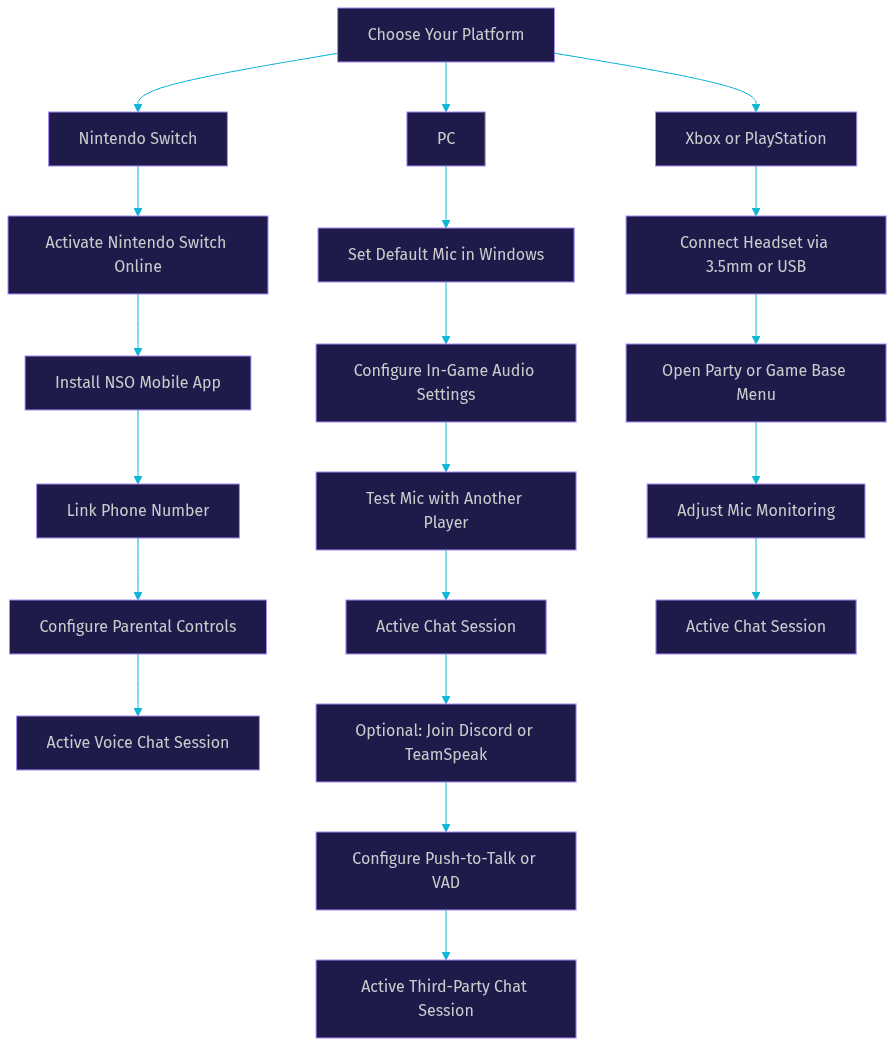
Platform-Specific Setup Walkthroughs
Each gaming platform handles chat differently, and understanding these differences prevents hours of troubleshooting.
Nintendo Switch (Video Game Chat Guide) - Initial Setup
Nintendo Switch chat setup requires more steps than other consoles. You need an active Nintendo Switch Online membership to access voice chat in compatible games. Some titles require the Nintendo Switch Online mobile app on your smartphone, which handles voice processing while the game runs on the console.
Start by linking your Nintendo account to a phone number through the Nintendo Switch Online app. This verification step is mandatory for voice chat access. For parental controls, use the Nintendo Switch Parental Controls mobile app to restrict voice chat entirely or limit it to approved friends only. The app lets you set communication restrictions per child account, which is critical for younger players.
Games like Splatoon 3 and Mario Kart 8 Deluxe route voice chat through the mobile app rather than natively on the console, which means you need both devices active simultaneously.
PC and Console (Xbox, PlayStation)
PC chat setup is the most flexible of any platform. On Windows, most games handle voice chat natively through the game client, using your default microphone and audio output devices configured in Windows Sound settings. Verify your default communication device is set correctly in Windows before launching any game.
Xbox Series X/S and PlayStation 5 both support native voice chat through party systems and in-game channels. On Xbox, configure your headset through the Xbox Accessories app and adjust mic monitoring in the audio settings. On PlayStation 5, the Game Base menu handles party creation and voice chat setup, with mic level adjustment available in the sound settings.
Both consoles support 3.5mm headsets and USB headsets. The key configuration step on all platforms is ensuring your chat audio routes to your headset rather than your TV speakers, which prevents echo for other players.
Third-Party Apps (Discord, TeamSpeak)
When native game chat falls short, third-party applications fill the gap. Discord is the dominant choice for PC gamers, offering server-based voice and text channels, screen sharing, and low-latency voice communication. According to Discord's developer documentation, the platform supports millions of concurrent voice connections through its proprietary WebRTC-based infrastructure.
TeamSpeak remains popular among competitive gaming communities for its lower resource usage and granular permission system. Setting up either app involves creating or joining a server, configuring your push-to-talk or voice activation settings, and selecting the correct input and output devices.
For console players, Discord is available natively on Xbox Series X/S and PlayStation 5, though some features like screen sharing work best on PC. The Discord developer portal provides integration resources for developers building game companion apps.
Essential Hardware and Network Considerations
Hardware and network quality directly determine whether your game chat experience is clear or frustrating.
Microphone and Camera Recommendations
For budget-friendly options, the HyperX Cloud II headset includes a noise-canceling microphone that performs well above its price point. The SteelSeries Arctis Nova 1 offers similar value with a ClearCast mic that reduces background noise effectively. Both connect via 3.5mm and work across PC, Xbox, and PlayStation.
For premium setups, the Shure MV7 is a broadcast-quality USB microphone that delivers professional voice clarity for streamers and competitive players. The Blue Yeti X offers multi-pattern recording and onboard audio controls. If your game includes video chat or streaming features, the Logitech BRIO 4K provides high-quality video with HDR support.
The key principle is matching your hardware to your use case. A squad-based shooter needs a clear headset mic with noise suppression. A streaming setup benefits from a dedicated USB mic and camera. Avoid built-in laptop microphones and webcam mics for any serious gaming communication.
Network-Adaptive Streaming and Latency
Bandwidth directly affects voice quality in game chat. Voice communication typically requires 24 to 64 kbps per participant, which is modest compared to video. However, latency matters more than bandwidth for game chat. A connection with high bandwidth but high latency produces choppy, delayed audio that ruins competitive play.
VideoSDK addresses this through network-adaptive streaming, which automatically adjusts bitrate and resolution based on real-time bandwidth detection. When a player's connection degrades, the SDK reduces audio quality gracefully rather than dropping the connection entirely. This is the same principle that keeps mobile calls intelligible when switching between Wi-Fi and cellular data.
For optimal game chat latency, use a wired Ethernet connection when possible. If Wi-Fi is necessary, connect on the 5GHz band and minimize the number of devices sharing the network. Close bandwidth-heavy applications like streaming services or large downloads during competitive sessions.
Game Chat Etiquette and Community Guidelines
Good communication wins games, but poor communication destroys communities.
Basic Communication Rules
Effective game chat follows a few core principles. Keep callouts short and specific: "enemy at B site" beats "there is a guy somewhere over there." Use push-to-talk in noisy environments to prevent background audio from flooding the channel. In text chat, avoid spamming repeated messages, as this buries important callouts from teammates.
Acknowledge information from teammates even with a simple "got it" or "copy." Silence in voice chat creates uncertainty about whether your callout was heard. In text chat, use the game's ping system alongside text messages to provide visual context.
Respect role-based communication. In a raid, the raid leader's instructions take priority. In a competitive match, the in-game leader calls the strategy. Unstructured chatter during critical moments causes misplays and frustration.
Handling Toxicity and Moderation
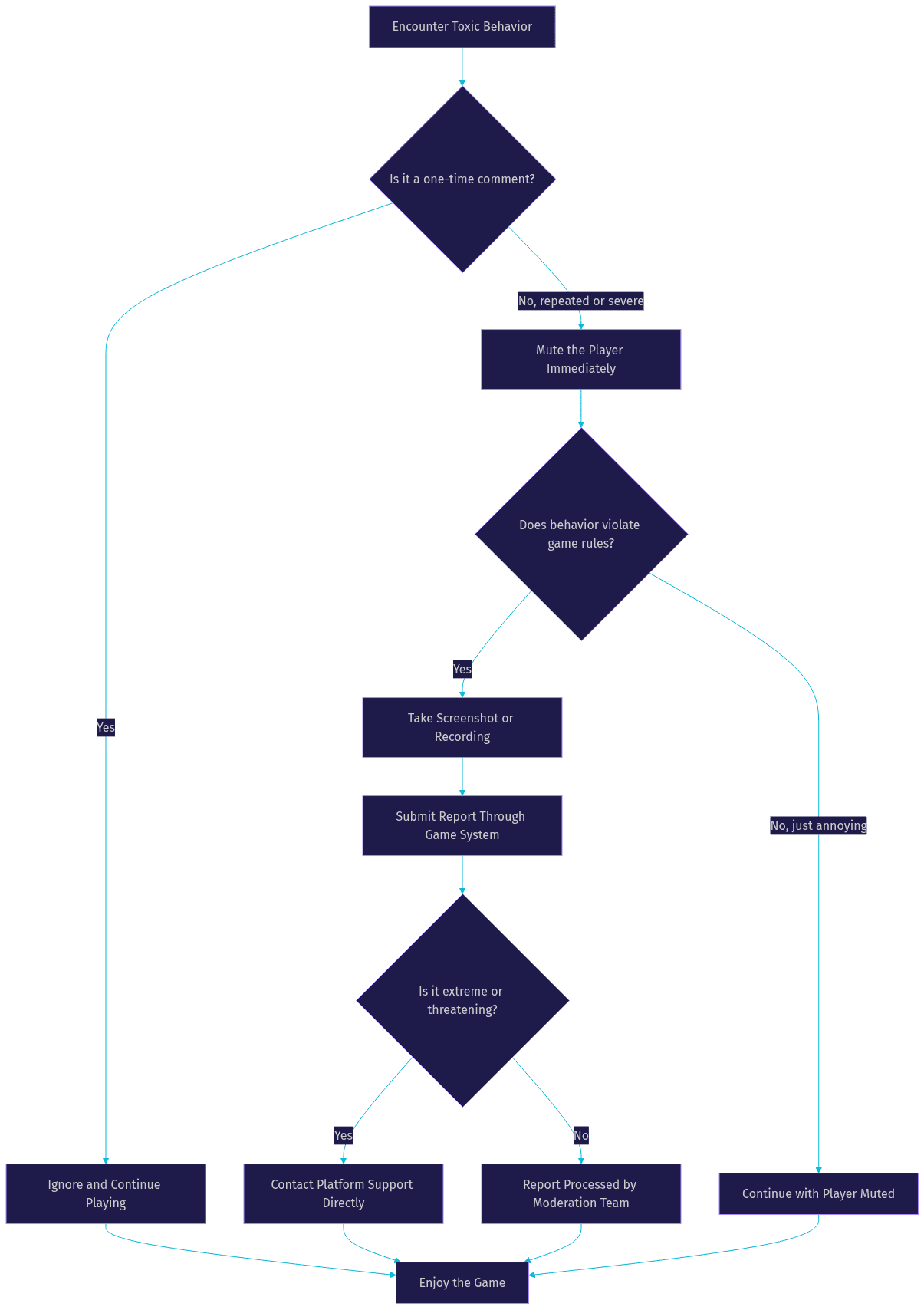
Every multiplayer game encounters toxic behavior eventually. The standard escalation path is ignore, mute, report. Most games include a quick-mute feature accessible through the scoreboard or player list. Use it liberally. Muting a toxic player protects your focus and prevents escalation.
For persistent harassment, use the game's report system. Include screenshots or recordings when the platform supports it. Most modern games employ automated moderation tools that flag hate speech, threats, and extreme profanity in text chat. Voice chat moderation remains harder, though some platforms now use real-time transcription to detect toxic speech patterns.
For developers building custom chat systems, VideoSDK provides role-based access control and moderation features through its SDK. Server administrators can mute, kick, or ban participants programmatically using the VideoSDK REST API. This allows game developers to build moderation tools directly into their chat infrastructure.
Building Your Own In-Game Chat System
For game developers, building custom chat infrastructure is a significant architectural decision that affects player retention and competitive integrity.
Core Features Checklist
A production-ready in-game chat system needs several core features. Voice channels with configurable participant limits allow squad-based and team-based communication. Text channels with persistence let players communicate asynchronously. Friend approval systems prevent unwanted contact from strangers. Privacy controls, including push-to-talk, voice activation detection, and mic muting, give players agency over their communication.
Additional features that distinguish good chat systems from great ones include proximity-based voice chat for open-world games, channel moderation tools for community managers, cross-platform compatibility so PC and console players can communicate, and recording capabilities for dispute resolution or content creation.
VideoSDK supports many of these features through its room-based architecture. Developers can create separate rooms for different squads, manage participant roles, and enable or disable video tracks depending on whether the game needs voice-only or video chat. The VideoSDK code samples include examples for Unity, React Native, and other platforms relevant to game development.
Choosing a Real-Time Communication SDK
Selecting the right RTC SDK depends on your game's platform targets, latency requirements, and development resources. WebRTC-based SDKs offer open standards and broad compatibility but require significant infrastructure investment for production deployment. Proprietary SDKs handle infrastructure but may limit customization and create vendor lock-in.
VideoSDK occupies a middle ground by providing WebRTC-based communication with managed infrastructure. The SDK supports Unity, which is critical for game developers, along with React Native, Flutter, C++, and Python. This multi-platform coverage means a single chat implementation can serve PC, mobile, and console builds.
Key evaluation criteria for game chat SDKs include latency under load, SDK size and performance impact on game frame rates, platform coverage, pricing model for concurrent players, and the availability of features like noise suppression and network-adaptive streaming. VideoSDK includes built-in noise suppression and automatic bitrate adjustment, both of which matter for gaming where background noise and unstable connections are common.
For developers ready to integrate, the VideoSDK React SDK quickstart provides a starting point, and the Unity SDK documentation covers game engine integration specifically.
Troubleshooting Common Issues
Even well-configured game chat systems encounter problems. Here are the most frequent issues and their solutions.
Connection Failures and Error Codes
Connection failures typically stem from three causes: network restrictions blocking UDP traffic, expired or invalid authentication tokens, and server-side capacity limits. If your game chat suddenly stops working, first check whether your firewall or router is blocking UDP ports, which WebRTC relies on for real-time media transport.
For developers using VideoSDK, token-related connection failures occur when the authentication token expires or was generated with incorrect permissions. The solution is regenerating the token server-side with the correct room ID and participant permissions. The VideoSDK authentication guide covers token generation in detail.
On console platforms, connection failures often relate to NAT type. Strict NAT prevents direct peer connections, requiring TURN servers to relay traffic. Most modern game chat systems include TURN fallback automatically, but if you are building your own, this is a mandatory consideration.
Audio Quality Problems
Echo is the most common audio quality issue in game chat. It occurs when your microphone picks up audio from your speakers or headset leakage. The fix is using a headset instead of speakers, enabling echo cancellation in your audio settings, and reducing mic monitoring levels if your headset supports it.
Background noise degrades voice clarity significantly. Keyboard sounds, fan noise, and household activity all contribute. VideoSDK includes built-in noise suppression that filters non-voice frequencies, which is particularly valuable for gaming environments where mechanical keyboards are common. For players using third-party apps, tools like NVIDIA RTX Voice or Discord's Krisp noise suppression provide similar filtering.
Audio cutting in and out usually indicates bandwidth instability. If you are on Wi-Fi, switching to Ethernet often resolves this. For developers, implementing network-adaptive streaming ensures the audio quality degrades gracefully rather than cutting out entirely when bandwidth fluctuates.
Quick Recap and Next Steps
This video game chat guide covered platform-specific setup for Nintendo Switch, PC, Xbox, and PlayStation, along with third-party alternatives like Discord and TeamSpeak. We explored hardware recommendations, network considerations for low-latency communication, etiquette guidelines, and moderation strategies for handling toxic behavior.
For developers, the guide outlined the core features needed in a custom in-game chat system and compared RTC SDK options, with VideoSDK emerging as a strong choice for game developers due to its Unity support, multi-platform coverage, and built-in noise suppression and network-adaptive streaming.
Next steps depend on your role. Players should configure their platform settings and test with friends before jumping into competitive matches. Developers should evaluate their platform targets and latency requirements, then explore the VideoSDK documentation for integration guidance. The VideoSDK code samples provide practical starting points for Unity, React Native, and other game-relevant platforms.
Definitions Glossary
Voice Activity Detection (VAD): A technology that detects when a player is speaking and automatically transmits audio, eliminating the need for push-to-talk. VideoSDK includes VAD as part of its audio processing pipeline.
Network-Adaptive Streaming: Automatic adjustment of audio and video bitrate based on real-time bandwidth conditions. VideoSDK implements this to maintain call quality when player connections degrade.
TURN Server: A relay server that routes WebRTC traffic when direct peer connections fail due to NAT restrictions or firewall rules. Essential for game chat on strict network configurations.
Room: A VideoSDK meeting room that participants join to share audio and video streams, identified by a unique room ID. In gaming, rooms map to squad channels, team channels, or lobby chat.
Push-to-Talk (PTT): A communication mode where audio transmits only while a specific key is held, preventing background noise from reaching other players. Standard in competitive gaming configurations.
Key Takeaways
- Game chat splits into text and voice modes, with hybrid systems serving games that need both persistent communication and real-time callouts.
- Platform setup varies significantly, with Nintendo Switch requiring the mobile app, PC offering the most flexibility, and consoles providing native party systems.
- Hardware quality and network stability matter more than raw bandwidth for game chat, with wired connections and noise-suppressing microphones delivering the best experience.
- VideoSDK provides audio calling and video calling SDKs with Unity support, built-in noise suppression, and network-adaptive streaming, making it a strong choice for game developers building custom chat systems.
- Moderation tools including mute, block, and report are essential for maintaining healthy game communities, and developers can implement programmatic moderation through VideoSDK's role-based access control and REST API.
Conclusion
Building or configuring game chat is a balance of platform knowledge, hardware selection, network optimization, and community management. This video game chat guide covered the full spectrum from player setup to developer SDK selection, with VideoSDK emerging as a practical choice for game developers who need low-latency, multi-platform communication with built-in noise suppression and adaptive streaming. Whether you are configuring your headset for tonight's raid or architecting chat infrastructure for a new multiplayer title, the principles remain the same: prioritize latency, suppress noise, moderate proactively, and choose tools that scale with your player base. Explore the VideoSDK documentation to start integrating real-time communication into your game, or sign up at app.videosdk.live/login to claim your free credits. What are you building with VideoSDK? Drop a comment below, I would love to hear what kind of game chat use case you are working on.
Free $20 Balance for AI Voice Agents & Video Calls
FAQ