


An Android HLS player is a media playback component that streams HTTP Live Streaming content, adapting video quality in real time to the device's bandwidth. Google's Media3 ExoPlayer is the default choice for Android HLS playback, while SDKs like VideoSDK add live streaming, recording, and interactive features on top. This guide walks you through the architecture, DRM, low-latency options, and troubleshooting you need before shipping.
Live streams break in the most inconvenient ways. The video freezes on a train tunnel, the quality drops to a blurry mess on hotel Wi-Fi, or the DRM license silently expires mid-match. If you have shipped any Android HLS player in production, you have probably chased at least one of these bugs at 2 a.m.
This guide delivers the full picture for 2026: what HLS actually is, how the Android HLS player landscape looks, how Media3 (ExoPlayer) handles HLS under the hood, and how to deal with DRM, subtitles, low-latency live streaming, and the failure modes that bite hardest. By the end, you will know which player to pick and how to make it survive real-world networks.
What Is HLS and Why It Matters on Android?
HLS is defined as HTTP Live Streaming, an adaptive bitrate protocol created by Apple that delivers video over plain HTTP. The server splits content into short media segments and publishes a playlist file that lists them. The player repeatedly fetches the playlist, downloads segments, and plays them back-to-back.
HLS works by offering multiple renditions of the same content at different bitrates and resolutions. The player measures download throughput, then switches between variants to keep playback smooth. When bandwidth drops, it falls back to a lower rendition; when bandwidth recovers, it climbs back up.
On Android, HLS matters because it is the dominant format for live events, sports, news, and long-form video. It traverses firewalls and CDNs effortlessly since it is just HTTP, and it adapts to the wildly variable mobile networks Android devices live on. Most Android live HLS deployments also lean on HLS for VOD, making one protocol cover both use cases.
Android HLS Player Landscape
Choosing an Android HLS player in 2026 means choosing between the platform-standard toolkit and commercial SDKs that bundle more of the stack. Here is how the main options compare.
Media3 / ExoPlayer is Google's official media library for Android. It handles HLS, DASH, and progressive playback, with first-class support for DRM, subtitles, and low-latency HLS. It is free, open source, and the baseline every other option is measured against.
GSYVideoPlayer is a popular open-source Chinese-community player built on ExoPlayer and other backends. It ships a full-featured UI out of the box, which speeds up simple apps but adds weight if you need a custom interface.
FastPix targets teams that want playback plus analytics, DRM, and ad insertion managed from one vendor dashboard, trading control for convenience.
VideoSDK covers a different need: real-time, interactive streaming. Its interactive live streaming mode keeps latency low enough for two-way interaction, and it also supports HLS output for large audiences. If your app needs viewers to raise hands, chat, or join the stage, VideoSDK is the strongest fit.
| Player | Cost | HLS Support | DRM | Live Interaction | Best For |
|---|---|---|---|---|---|
| Media3 / ExoPlayer | Free, open source | Native, deep | Widevine, PlayReady, AES-128 | No (playback only) | Custom apps needing full control |
| GSYVideoPlayer | Free, open source | Via ExoPlayer backend | Limited | No | Fast UI-driven prototypes |
| FastPix | Commercial | Managed | Included | No | Teams wanting analytics plus playback |
| VideoSDK | Free tier with credit | HLS plus low-latency ILS | E2E encryption options | Yes, sub-second | Live shopping, webinars, interactive events |
The table's most important row is the last one. If your stream is one-to-many broadcast, Media3 handles it well. If your audience needs to talk back in real time, you need an interactive layer, and that is where VideoSDK's live streaming SDK earns its place.
Deep Dive: Media3 (ExoPlayer) as the Core Android HLS Player
Media3 ExoPlayer is the reference Android HLS player, and understanding its architecture saves you hours of debugging. Playback flows through a clean pipeline: you describe what to play, the library resolves it into a media source, and the player renders it to a surface.
The flow starts with a MediaItem, a declarative description of your content: the stream URL, DRM configuration, subtitle tracks, and ad tags. ExoPlayer's internal media source factory inspects the content type and builds an HlsMediaSource for HLS URLs. That source manages playlist fetching, variant selection, segment loading, and track merging. The player instance then feeds decoded frames and audio to the rendering surface and speakers.
The player lifecycle matters as much as the pipeline. ExoPlayer expects you to prepare it when playback should begin, release it when the screen or activity goes away, and pause background work when the app loses focus. Getting this wrong is the number one cause of battery drain and audio continuing after the app is minimized.
Using MediaItem for Simple HLS Playback
For straightforward playback, the high-level path is short. You create a MediaItem pointing at your HLS playlist URL, hand it to the player, and call prepare. The library auto-detects the HLS content type, builds the media source, and starts buffering.
The outcome you should expect: within a second or two on a healthy network, the first frame renders and adaptive bitrate switching begins automatically. You do not need to configure variant selection for basic use; ExoPlayer's default bandwidth meter handles it. This simplicity is why MediaItem is the recommended entry point for most Android HLS streaming apps.
When to Use HlsMediaSource for Advanced Scenarios
Directly constructing an HlsMediaSource is the advanced path. You take it when you need custom data source factories, for example to attach request headers for token-authenticated streams, or to route segment fetches through your own caching layer.
It also unlocks pre-loading, where you begin fetching segments before the user hits play to shrink startup time, and manual variant capping, where you constrain maximum resolution to protect devices with weak decoders or limited screens. If your Android HLS player performance tuning involves precise control over buffer durations or initial variant selection, this is where it happens.
DRM, Subtitles, and Metadata Support
Commercial Android HLS streaming almost always needs content protection, captions, or timed metadata, and Media3 covers all three.
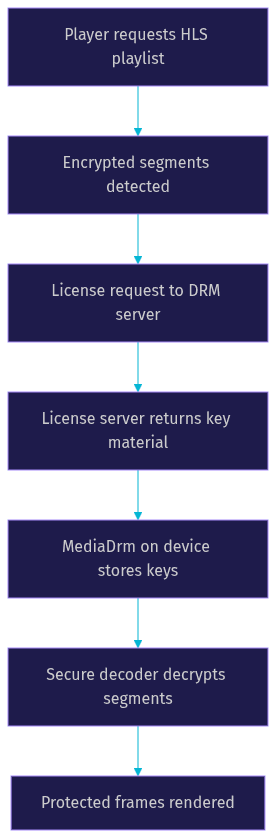
For DRM, HLS supports AES-128 encryption (where the player fetches a key from a key server and decrypts segments locally) and the stronger sample-level encryption used with Widevine. Widevine is the standard on Android: the player requests a license from your license server, receives key material, and decrypts content inside the platform's secure decoder path. L1-level Widevine keeps 4K and HD content protected at the hardware level.
For subtitles, Media3 supports WebVTT and CEA-608/708 embedded captions carried inside HLS segments, plus sidecar subtitle files referenced from the master playlist. Track selection APIs let you expose a caption picker and persist the user's language choice.
For metadata, HLS can carry ID3 tags and EMSG boxes in fMP4 streams. These carry timed events such as ad markers, chapter boundaries, or live cue points. Media3 surfaces them through metadata callbacks, letting your app react to stream events in sync with playback, which is essential for HLS ad insertion on Android.
Low-Latency HLS and Live Streaming on Android
Standard HLS live latency sits around 15 to 30 seconds, which is fine for broadcast-style content and painful for anything interactive. Apple's low-latency HLS (LL-HLS) reduces this by adding partial segments, playlist delta updates, and a blocking reload mechanism so the player fetches tiny chunks as they are produced instead of waiting for full segments.
Media3 supports LL-HLS natively. When the player encounters the required playlist tags, such as partial segment declarations and server control directives, it switches to partial segment loading and delta playlist updates automatically. In practice, teams report end-to-end latency in the 2 to 5 second range with a well-tuned LL-HLS origin, though real numbers depend heavily on CDN configuration and segment duration.
Server-side, you need an origin or packager that produces LL-HLS output and a CDN that supports blocking playlist reloads. The player can only be as fast as the slowest hop.
There is a second option worth knowing. If your use case needs sub-second latency, true audience participation, or viewers promoted to speakers, HLS is the wrong tool entirely. VideoSDK's interactive live streaming keeps latency low enough for real conversation, and you can still push an RTMP output to YouTube or Twitch for the broadcast audience. For live shopping, tutoring, or town halls, that combination beats fighting HLS latency limits.
Best Practices and Performance Tips
A production Android HLS player survives on details, not defaults. These practices separate smooth deployments from support tickets.
Encode smart ladders. Offer 4 to 6 renditions with sensible bitrate steps so the adaptive algorithm can move gracefully. A ladder that jumps from 800 kbps to 5 Mbps causes visible quality whiplash.
Tune buffers deliberately. Longer buffers absorb network turbulence but add startup latency and memory pressure. Shorter buffers feel snappier but stall more. Match buffer settings to your use case: aggressive for short-form, generous for live sports.
Handle configuration changes. Rotation and app switching must not restart playback. Retain the player instance across configuration changes and release it only when the activity is truly destroyed, or your users will rage-quit every time they rotate the phone.
Watch battery impact. Hardware decoders are dramatically more efficient than software fallbacks. Cap resolution on low-end devices, and avoid keeping the player prepared when playback is paused for long periods.
Test on real networks. Use Android's built-in network condition tooling and emulator bandwidth throttling to simulate 3G, packet loss, and handovers before your users do it for you.
Common Troubleshooting Scenarios
Even a well-built Android HLS player hits problems. Here are the frequent ones and how to diagnose them.
Playback stalls repeatedly. Usually a bandwidth mismatch: the variant ladder is too aggressive for the network, or the buffer is too short. Check the player's bandwidth meter readings against the stream's lowest rendition bitrate.
Codec mismatch errors. HLS on Android expects H.264 or H.265 video with AAC audio. A stream encoded with an unsupported profile fails instantly. Inspect the master playlist's codec attributes against the device's decoder capabilities.
DRM errors mid-stream. License expiry or a key server timeout causes sudden failure. Implement license renewal and surface a clear error state rather than a frozen frame.
Subtitle sync drift. Out-of-sync captions usually trace to a mismatch between the subtitle track's timing base and the live edge. Verify your WebVTT cues are anchored to media time, not wall-clock time.
Behind-live-window errors on live streams. The player fell too far behind the live edge and the playlist no longer contains the needed segments. Catch the error and re-join at the live edge instead of failing silently.
Definitions Glossary
HLS (HTTP Live Streaming): An adaptive bitrate streaming protocol that delivers video as short HTTP segments described by playlist files. Android HLS player libraries fetch these playlists repeatedly and switch quality variants based on measured bandwidth.
MediaItem: A declarative description of content in Media3, including the stream URL, DRM configuration, and subtitle tracks. It is the recommended entry point for simple HLS playback on Android.
HlsMediaSource: The Media3 component that manages HLS playlist fetching, variant selection, and segment loading. Developers construct it directly when they need custom data sources, pre-loading, or manual variant control.
Adaptive Bitrate (ABR): The mechanism by which a player measures download throughput and switches between stream renditions to keep playback smooth without stalling.
Low-Latency HLS (LL-HLS): An Apple extension to HLS using partial segments and delta playlist updates to reduce live latency from 15 to 30 seconds down to roughly 2 to 5 seconds in practice.
Widevine: Google's DRM system used on Android for protected HLS content. The player fetches license key material from a license server and decrypts segments through the platform's secure decoder path.
Key Takeaways
- Media3 ExoPlayer is the default Android HLS player in 2026, with native support for adaptive bitrate, DRM, subtitles, and low-latency HLS.
- Use MediaItem for simple playback and construct an HlsMediaSource directly only when you need custom data sources, pre-loading, or variant control.
- Widevine handles commercial DRM on Android, while WebVTT and CEA-608/708 cover captions, and ID3/EMSG metadata enables timed in-stream events.
- Standard HLS live latency is 15 to 30 seconds; LL-HLS brings it to roughly 2 to 5 seconds, but truly interactive streams need a low-latency interactive SDK like VideoSDK.
- Most production failures trace to variant ladders, codec mismatches, DRM license expiry, or falling behind the live window, and all are diagnosable with the player's analytics callbacks.
Conclusion
Building a reliable Android HLS player in 2026 comes down to picking the right layer for your needs. Media3 ExoPlayer covers playback, DRM, and low-latency HLS with deep control. Commercial SDKs trade that control for bundled analytics and faster setup. And when your audience needs to interact in real time rather than just watch, VideoSDK's interactive live streaming closes the gap HLS cannot. Start with the official Media3 documentation, explore VideoSDK's live streaming docs for interactive use cases, and grab a free API key at app.videosdk.live to test low-latency streaming yourself. What are you building with HLS on Android? Drop a comment, I'd love to hear what kind of streaming use case you're working on.
Free $20 Balance for AI Voice Agents & Video Calls
FAQ